Home > Resources > Gaming Headset Guide
What Firmware Functions Should Brands Define for a 2.4GHz Gaming Headset?
A technical buyer guide to defining, testing and approving firmware behavior across 2.4GHz, Bluetooth and 3.5mm gaming headset modes before mass production.
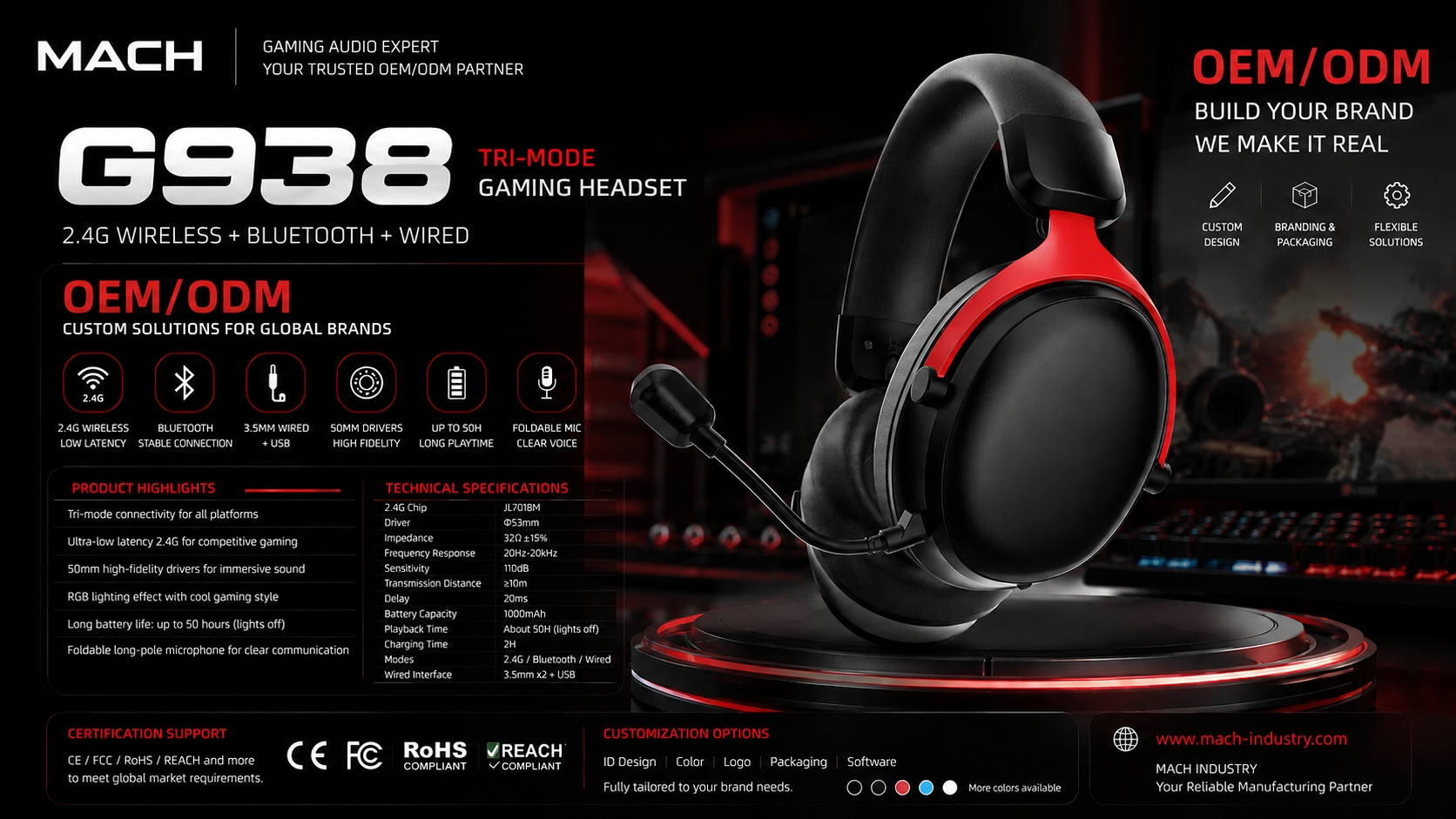
Gaming headset firmware customization should begin with a written behavior matrix covering every connection mode, control, indicator, microphone state, DSP function, power state and recovery condition. Buyers should approve both headset and transmitter firmware versions before mass production.
A request such as 'customize the firmware' is not an acceptance specification. Procurement and product teams need to describe what the user does, what the headset should do, which mode is active, what the indicator and prompt should communicate, and how the system recovers from interruption. This article provides a practical framework for defining and validating those behaviors without assuming that every platform supports every function.
What Is Gaming Headset Firmware Customization?
Firmware customization means controlling documented product behavior in software; it is not the same as changing hardware, and it does not automatically mean developing a new firmware architecture.
Hardware defines physical capability: the chipset, radio, PCB, buttons, LEDs, microphone circuit, battery system and audio path. Firmware tells supported hardware how to behave. It can govern pairing, mode selection, button mapping, indicators, prompts, microphone states, DSP selection, charging indications, sleep and recovery. A requested behavior is feasible only when the selected hardware and platform architecture support it.
Changing a Bluetooth device name, prompt file, LED color mapping or shutdown timer is usually a platform configuration task. Adding a new multipoint scheme, a new host protocol, a mobile application, OTA updating or an unsupported DSP path may require deeper development and validation. Buyers should ask the supplier to classify every request as existing configuration, controlled modification or new development before quotation and sampling.
The specification should describe behavior rather than use the broad phrase 'firmware customization.' For example: 'When the headset is in 2.4GHz mode and the paired transmitter is reinserted after host sleep, audio and microphone shall reconnect without the user entering pairing mode.' That sentence can be implemented, tested and accepted; the generic phrase cannot.
Build a Connection-Mode Behavior Matrix
Define each function separately for 2.4GHz, Bluetooth and 3.5mm because the three modes may use different signal paths, host controls and power conditions.
Start by listing every supported mode in the exact project configuration. Then mark each function as required, optional, unavailable or subject to sample validation. Do not transfer a 2.4GHz feature claim to Bluetooth or analog operation merely because the headset has all three connections.
The matrix below is a specification template, not a claim about every MACH headset. Replace every 'project-defined' entry with the approved behavior of the selected platform and host list.
| Function | 2.4GHz | Bluetooth | 3.5mm | Buyer acceptance point |
|---|---|---|---|---|
| Game audio | Receiver-based digital path | Profile and host-dependent path | Analog source path | Name hosts, channels, volume conditions and limitations |
| Microphone return | Confirm two-way voice through approved transmitter | Confirm call or communication profile | Confirm plug wiring and host jack support | Record microphone route for every host |
| Volume control | Define local or host-synchronized steps | Define Bluetooth volume behavior | May depend on analog controls | Check minimum, maximum and step consistency |
| Mute | Define button, state memory and indication | Define call-state behavior | May be hardware-dependent | Verify mute after reconnect and mode switching |
| Virtual 7.1 | Project-defined digital processing path | Do not assume support | Do not assume analog processing | State activation method, software and supported hosts |
| RGB | Define pattern and memory | Define pattern and power policy | Confirm whether external power is required | Approve colors, sequence and power-state behavior |
| Voice prompts | Define connection and mode prompts | Define pairing and call prompts | Usually no wireless prompts | Approve language, file, volume and trigger timing |
| Reconnection | Define headset-transmitter recovery | Define known-host recovery | Not applicable to analog audio | Test distance loss, sleep, restart and mode return |
| Host compatibility | Named transmitter-host matrix | Named Bluetooth profiles and hosts | Named jack wiring and adapters | Approve a device matrix, not a universal claim |
| Charging behavior | Define operation while charging | Define operation while charging | Confirm powered and unpowered functions | Document restrictions, indicators and thermal checks |
Define Pairing and Reconnection Logic
Pairing requirements should cover factory setup, user recovery, replacement transmitters and version compatibility, not only the first successful connection.
For first use, define whether the headset and USB transmitter are paired at the factory, how the user recognizes a successful link, and how long the connection attempt continues. Production testing should verify that the packaged headset is paired with the packaged transmitter and that units cannot be mixed without detection.
Recovery scenarios need separate test cases: pairing information lost after reset, link loss beyond operating range, host sleep and wake, transmitter removal and reinsertion, headset restart, battery depletion, and switching from Bluetooth back to 2.4GHz. Specify whether recovery is automatic, timed or initiated by a button sequence.
Replacement transmitters create an after-sales requirement. The buyer should define whether field pairing is supported, which headset and transmitter revisions are compatible, how replacement parts are labeled, and whether a service tool or controlled procedure is required. Headset firmware and transmitter firmware must be treated as a compatible version pair.
- Factory pre-pairing and production verification
- First-use indication and timeout
- Manual pairing entry and exit
- Out-of-range loss and automatic recovery
- Host sleep, wake and USB reinsertion
- Bluetooth-to-2.4GHz mode return
- Reset and lost-pairing recovery
- Replacement transmitter procedure
- Headset and transmitter version compatibility
- Failure-state indication and user instructions

Specify Buttons, Indicators and Voice Prompts
A control specification should map every click pattern to a mode, product state, visible indication and audible response.
Single click, double click and long press can mean different things depending on mode and current state. A power button might also control mode switching or pairing. Volume keys may change track in Bluetooth mode but have no track function in 2.4GHz. Define press duration and conflict priority so accidental or ambiguous actions can be tested.
LED specifications need actual colors, flash cadence, duration and priority. Pairing, connected, muted, charging, full charge and low battery can compete for the same indicator. Voice prompts need approved language files, pronunciation, loudness, trigger timing and interruption rules. The brand should approve the final files in the finished headset, not only as computer audio files.
| State or action | Mode | Control input | Expected behavior | LED indication | Voice prompt | Acceptance note |
|---|---|---|---|---|---|---|
| Power on | All powered modes | Long press: project-defined duration | Start in approved default or remembered mode | Approved startup sequence | Approved power-on file | Record startup time and default volume |
| Enter pairing | 2.4GHz | Approved button sequence | Search for compatible transmitter | Approved color and cadence | Pairing prompt if supported | Verify timeout and exit behavior |
| Mode change | 2.4GHz/Bluetooth | Single, double or long press as specified | Change once without unintended action | Mode-specific indication | Exact approved mode name | Verify during active and idle audio |
| Mute | Voice-capable mode | Approved mute action | Microphone route disabled | Persistent or timed mute indication | Mute on/off prompt if supported | Check state after reconnect |
| Low battery | Wireless modes | Automatic threshold event | Continue or restrict operation as specified | Approved warning pattern | Approved low-battery file | Define repeat interval and shutdown point |
| Charging complete | Charging | Automatic state change | Stop or maintain charge per hardware design | Approved full-charge state | Usually none unless supported | Check headset on and off |
Define Microphone Firmware States
Microphone acceptance must cover physical presence, mute state, wireless voice routing and transitions between modes.
A detachable boom creates more states than microphone on or off. Define behavior when the boom is absent, inserted, removed during communication and reinserted. If insertion detection is supported, document the indicator or prompt; if it is not supported, do not imply that firmware recognizes the physical state.
For 2.4GHz, verify two-way voice through the approved transmitter and hosts. For Bluetooth, define the supported communication profile, call transitions and audio-quality changes. During mode switching, specify whether the microphone mutes, reconnects automatically or requires a new application selection.
ENC and sidetone must be stated only when supported by the exact hardware and firmware configuration. If present, define activation, applicable modes, level or profile, memory state and acceptance method. A microphone component name alone does not prove either feature.
| Microphone condition | Required definition | Validation |
|---|---|---|
| Working | Active mode, host input, gain and routing | Record voice on each approved host |
| Muted | Control action, indicator, prompt and memory | Confirm no transmitted voice and correct recovery |
| Boom removed | Supported detection or documented absence of detection | Remove during idle and active communication |
| Boom reinserted | Automatic recovery or required user action | Repeat insertion and voice checks |
| 2.4GHz voice | Approved transmitter and host matrix | Check link, return path and reconnect |
| Bluetooth call | Profiles, call controls and routing | Test named phones, computers and applications |
| Mode transition | Mute, routing and application behavior | Switch modes during idle and active states |
Control DSP, EQ and Virtual 7.1 Claims
A DSP claim is valid only for the documented signal path, activation method, firmware or software version and approved hosts.
Virtual 7.1 may be processed in the headset, USB transmitter, host software or another digital stage. Buyers should define where processing occurs, whether PC software or a driver is required, how the user turns it on and off, and whether the setting is remembered after restart.
Validation should compare level, noise, delay, channel behavior and microphone operation with processing on and off. A Virtual 7.1 claim confirmed in a 2.4GHz PC path must not automatically be extended to Bluetooth or 3.5mm. Analog operation may bypass the relevant DSP entirely.
EQ presets, custom EQ, sidetone and noise-processing modes should be included only when the selected platform supports them. Name each preset, define its applicable mode, freeze the parameter version and conduct regression testing when firmware, DSP settings or PC software changes.
Define Power-Management Firmware
Power management should be specified as observable behavior under named wireless, lighting, charging and idle conditions.
Define idle sleep and automatic shutdown separately. State what counts as activity, whether a connected but silent transmitter prevents sleep, what happens during an active microphone session, and how the user wakes the headset. Low-battery warnings need a trigger policy, repeat interval and final shutdown behavior rather than an unsupported universal percentage.
Charging tests should cover headset on and off, approved charger or USB source, indicators, full-charge behavior and use while charging if the configuration supports it. Some functions may be restricted during charging; that limitation belongs in the specification and user instructions.
RGB and connection mode affect current consumption. Runtime claims therefore need defined volume, lighting, microphone, mode and test conditions. Also specify recovery from an abnormal power-key state, interrupted charging or firmware reset.
- Idle-sleep trigger and wake action
- Automatic shutdown conditions
- Low-battery warning and repetition
- Final shutdown behavior
- Charging indicator states
- Use while charging, if supported
- RGB state and power policy
- 2.4GHz and Bluetooth power conditions
- Charging-time functional restrictions
- Power-key and reset recovery
Create a Firmware Acceptance Matrix
Every approved firmware requirement should become a repeatable test row linked to exact headset and transmitter versions.
Use one record for engineering samples, golden-sample approval, pilot production and change validation. Add the host, application, environmental condition and repetition count when they affect the result. Actual result and evidence should be completed during testing; this template intentionally contains no invented pass data.
| Function | Mode | Initial state | User action | Expected behavior | Indicator | Prompt | Actual result | Headset FW | Transmitter FW | Pass/Fail | Notes |
|---|---|---|---|---|---|---|---|---|---|---|---|
| Example: reconnect after host wake | 2.4GHz | Headset linked; host asleep | Wake approved host | Reconnect according to approved timing and restore audio/mic route | Project-defined | Project-defined | Complete during test | Record version | Record version | Complete during test | Host, port, application and repetitions |
| Example: mute through mode switch | 2.4GHz to Bluetooth | Microphone muted | Switch mode | Follow approved mute-memory rule | Project-defined | Project-defined | Complete during test | Record version | N/A or record | Complete during test | Confirm communication application behavior |
Freeze Firmware Before Mass Production
Mass production should use an approved system baseline, not an untracked collection of headset, transmitter and control revisions.
Freeze the headset firmware, transmitter firmware, PCBA revision, chipset configuration, button mapping, indicator logic, voice-prompt files, Virtual 7.1 configuration, power-management logic, golden sample and test procedure. Record checksums or controlled version identifiers where the development system supports them.
Production programming and functional tests should verify the correct version pair. Labels, work instructions and replacement-stock records need enough traceability to prevent incompatible transmitters or firmware revisions from being mixed.
A change to firmware, PCB, transmitter, chipset, control mapping, prompt file, DSP setting or power logic requires impact review and regression testing of related functions. The retest scope should follow the changed signal or control path rather than assuming that a small revision is harmless.
- Headset firmware identifier
- Transmitter firmware identifier
- PCBA revision and chipset configuration
- Button and control map
- LED and indicator specification
- Approved voice-prompt files
- Virtual 7.1 and DSP configuration
- Power-management behavior
- Signed golden sample
- Approved acceptance and production test procedure
G938 Product Example
G938 Black demonstrates why a multi-connection headset needs a mode-specific firmware and transmitter specification.
The confirmed G938 Black reference combines a JL7018M-based 2.4GHz path and USB transmitter with Bluetooth, 3.5mm audio, Virtual 7.1, a 50mm driver, RGB and microphone functions. Firmware and Virtual 7.1 configuration remain subject to project evaluation.
For this type of platform, buyers should document what remains active in each mode, how the headset and transmitter pair, which host controls are supported, where Virtual 7.1 is processed, and how RGB, microphone and power states behave. The example illustrates a specification method; it does not mean every requested function is available without engineering review.
WH6 Korea Project Lesson
The WH6 project illustrates system validation and version control, not an undocumented claim of custom firmware development.
The WH6 Korea project includes a 2.4GHz wireless headset, Type-C transmitter, Virtual 7.1, RGB, detachable microphone, battery requirements, final sample validation, trial production and mass-production control. These elements interact as one finished system.
The project therefore illustrates why transmitter behavior, wireless operation, Virtual 7.1, RGB, microphone states and power functions must be reviewed against the approved sample and production baseline. Only functions documented in the approved project specification should be presented as confirmed firmware customization. This article does not claim WH6 OTA support, custom EQ or any other undocumented firmware result.
Firmware RFQ Checklist
A firmware RFQ should combine commercial scope with a behavior and acceptance specification.
Mark each item as required, optional or open for supplier recommendation. Attach the host matrix, prompt files or scripts, control map and acceptance worksheet where available. Certification and compliance support can be coordinated according to the final product configuration, project scope and target market.
- Target devices, operating systems and applications
- Required 2.4GHz, Bluetooth and 3.5mm modes
- Button actions and press durations by mode
- Voice-prompt languages, files, volume and timing
- LED and RGB colors, patterns and memory
- Microphone routing, mute and detachable-boom states
- Virtual 7.1, DSP and EQ requirements
- Sleep, shutdown, charging and low-battery behavior
- USB transmitter interface and replacement policy
- Upgrade method only if required and supported
- Target market and compliance destination
- Estimated quantity and launch schedule
- Firmware acceptance tests and version-control method
Conclusion
Firmware becomes controllable when every function is tied to a mode, state, action, expected result and approved version pair.
For a 2.4GHz gaming headset OEM project, the most useful deliverable is not a long feature list. It is a controlled behavior matrix covering the headset, USB transmitter, supported hosts, microphone, DSP, RGB and power system, followed by repeatable acceptance records and a frozen production baseline.
Brands that define these details before sampling can evaluate platform feasibility more accurately and reduce ambiguity between product management, engineering, quality, packaging and after-sales teams.
Discuss Your Gaming Headset Firmware Requirements
Send MACH your target devices, connection modes, control map, prompts, DSP requirements, transmitter interface, power behavior and acceptance plan for project evaluation.
Contact MACHFrequently Asked Questions
What gaming headset firmware functions can be customized?
Depending on the selected hardware platform, project scope may include pairing and reconnect behavior, button mapping, indicators, voice prompts, microphone states, RGB, DSP or Virtual 7.1 settings, sleep, charging indications and power management. Feasibility must be confirmed for the exact configuration.
Is changing a Bluetooth device name the same as custom firmware development?
No. Changing a device name is usually a platform configuration task. New protocols, applications, unsupported DSP paths or OTA functions may require deeper development and validation.
Should the headset and USB transmitter use controlled firmware versions?
Yes. The headset and transmitter operate as a paired system, so compatible versions should be approved, traceable and tested together before production.
Can Virtual 7.1 work in every connection mode?
Not automatically. Buyers must confirm the processing location, activation method, software requirement and supported modes. A 2.4GHz PC claim should not be extended to Bluetooth or 3.5mm without evidence.
How should buyers approve voice prompts and LED behavior?
Approve the exact prompt files, language, volume and trigger timing together with LED color, cadence, duration and priority in the finished sample and acceptance matrix.
Does firmware customization affect MOQ or development cost?
It can. Commercial impact depends on whether the request is an existing configuration, a controlled modification or new development, plus its validation and production-programming requirements. Suppliers should quote against a defined scope rather than a universal rule.
When should firmware be frozen before production?
Freeze the approved headset and transmitter versions before pilot and mass production, together with the PCBA revision, control map, prompt files, DSP settings, golden sample and test procedure.
Related Resources
Need OEM/ODM gaming audio solutions?
Contact MACH Industry to discuss your gaming headset, gaming earbuds, or private-label audio project.
Contact MACH Industry