Home > Resources > Gaming Headset Guide
How to Specify a 2.4GHz Gaming Headset Interface and Accessory Matrix
A buyer-focused guide to defining the receiver, adapter, charging cable, 3.5mm fallback, pairing flow and host validation for a private-label 2.4GHz gaming headset.
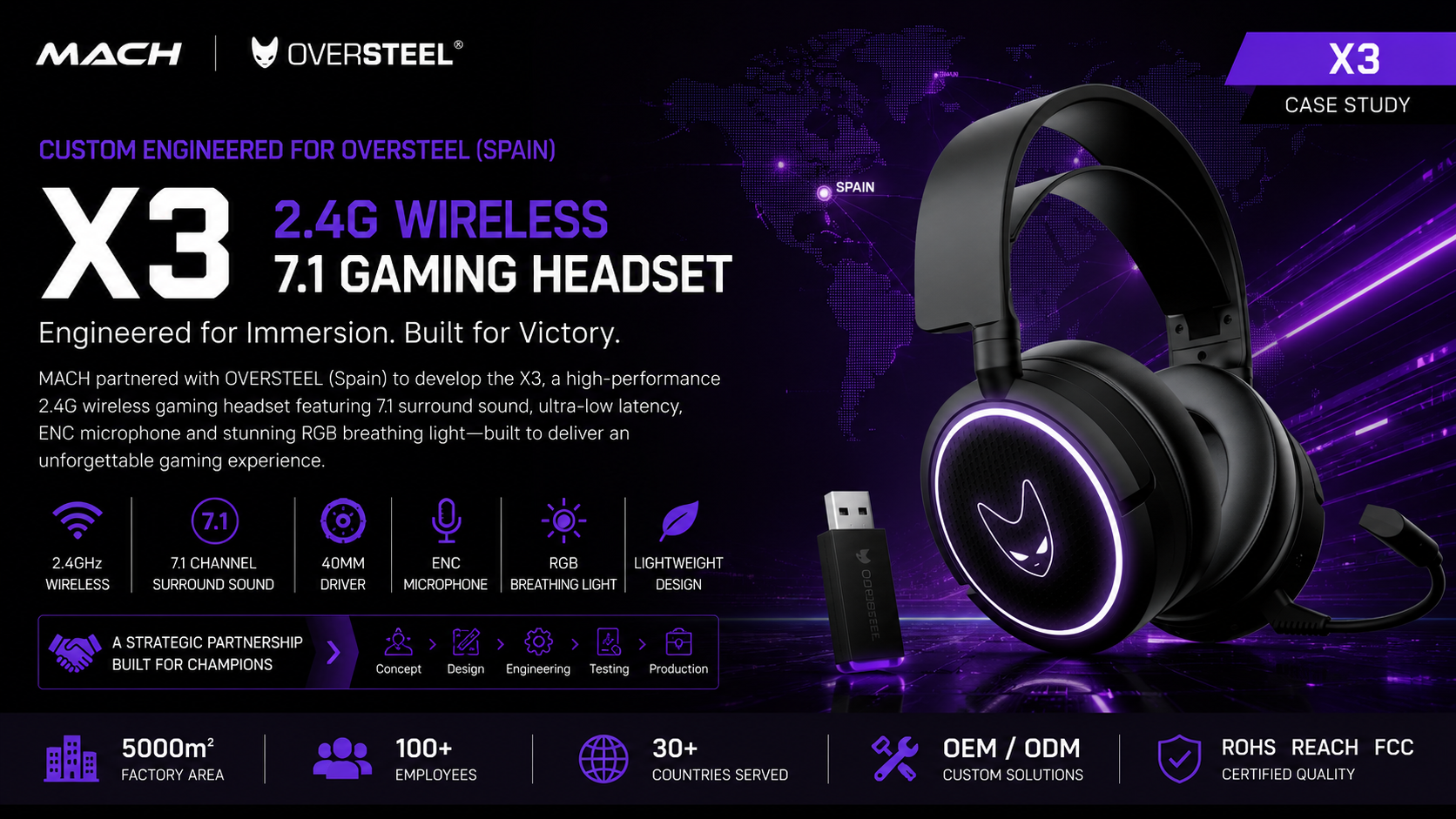
Gaming brands should specify a 2.4GHz wireless headset as a complete connection system, not as a headset plus an unspecified dongle. The product brief needs to identify the receiver connector, any required host adapter, the charging interface, the 3.5mm fallback path, the included cables, pairing behavior and the devices that must be validated. The most important purchasing decision is whether every promised use case can be supported by the exact hardware included in the retail box.
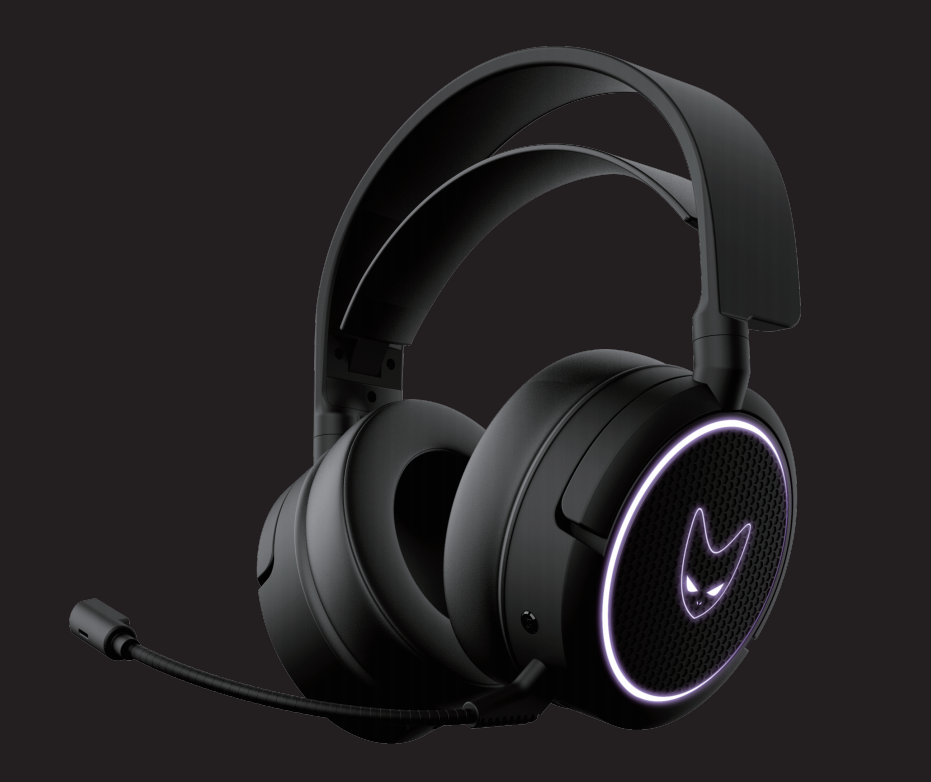
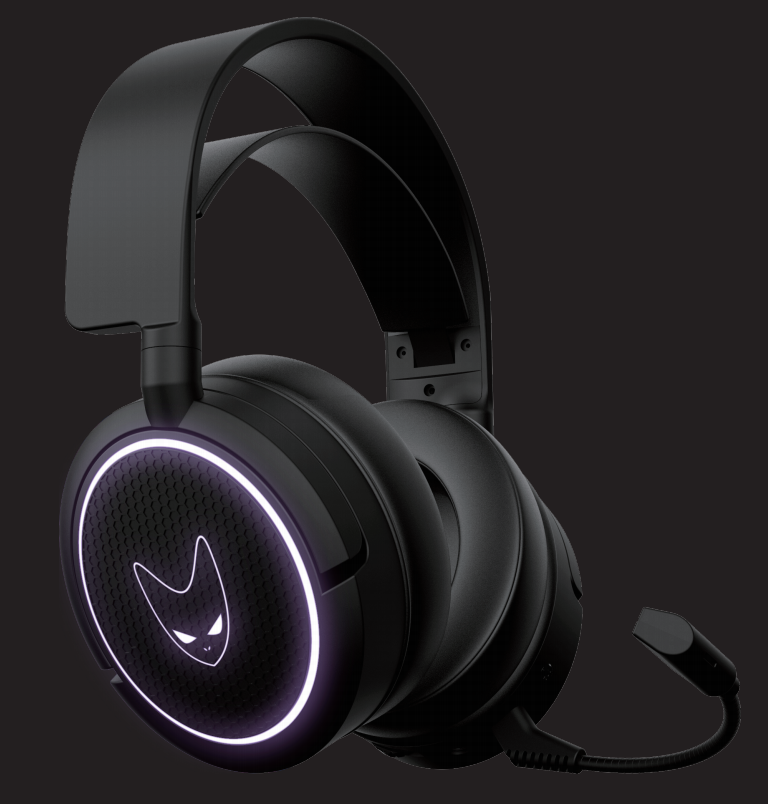
The X3 Spain OEM project illustrates this issue clearly. Its published materials confirm a Type-C 2.4GHz transmitter, a USB-A-to-Type-C adapter, Type-C headset charging, a 3.5mm audio cable, manual pairing guidance, virtual 7.1 and 2.0 modes, and a detachable noise-reduction microphone. These elements create flexibility, but they also create more interfaces, accessories and user journeys to control.
This guide turns that project evidence into a reusable decision framework for sourcing managers and product teams. X3 facts are identified as project references; test recommendations are general engineering guidance for future OEM and ODM projects.
Key Takeaways for Gaming Headset Buyers
A reliable 2.4GHz headset specification connects every target host and user scenario to one verified mode, one physical interface and one approved accessory set.
- Define the receiver connector and every adapter included in the retail box.
- Separate wireless data accessories from charging accessories in the bill of materials.
- Treat 3.5mm audio as a separate operating path with its own function limits.
- Map each host device to a connection method instead of claiming universal compatibility.
- Document first pairing, reconnection, mode switching and indicator behavior.
- Validate production-representative accessories together with the headset.
Why Headset Interface Planning Is a Buyer Problem
The same headset can create a good or poor customer experience depending on whether the receiver, adapter, cable and instructions match the buyer's target devices.
A Type-C receiver can suit compact devices with a Type-C port, while a USB-A host may need an adapter. The adapter then becomes part of the signal path and part of the approved product configuration. It needs a clear item number, mechanical fit, packaging location and validation plan. Substituting an apparently similar adapter during production can change fit or connection reliability.
Charging creates another source of ambiguity. A Type-C charging port does not prove that the same port carries audio or firmware data. The RFQ should state the supported role of every connector. Likewise, a 3.5mm cable may provide a useful wired path, but buyers should not assume that wireless controls, lighting, microphone routing or virtual surround behave identically in wired mode.
The purchasing objective is therefore not to maximize the number of connectors. It is to create the smallest accessory system that supports the intended devices with understandable setup, controlled cost and repeatable packing.
X3 Spain OEM Project Reference
The X3 reference combines dedicated 2.4GHz wireless operation with a Type-C transmitter, a USB host adapter, Type-C charging and a 3.5mm wired audio option.
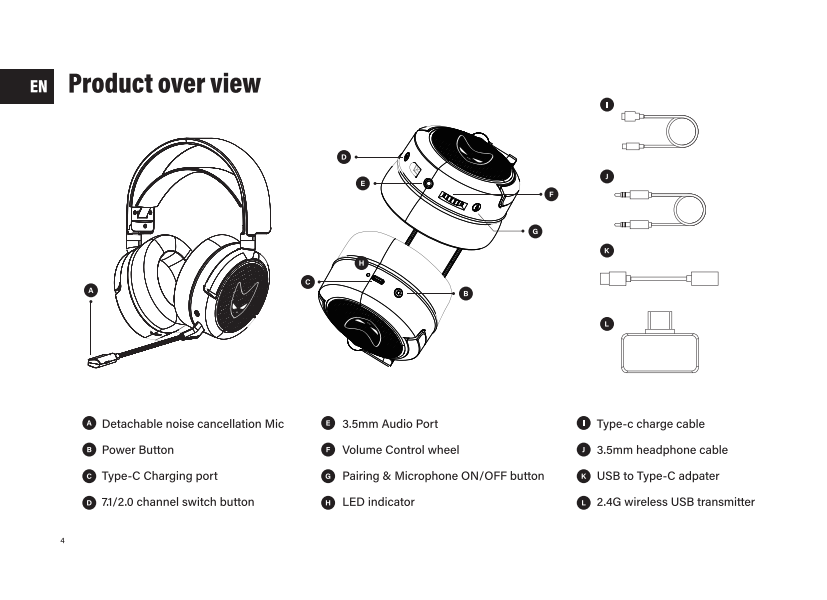
The approved product materials show a Type-C 2.4GHz transmitter, a USB-A-to-Type-C adapter, a Type-C charging cable and a 3.5mm headset cable. They also identify a detachable noise-reduction microphone, headset pairing and microphone controls, RGB lighting, and switching between virtual 7.1 and normal 2.0 audio modes.
The current case data records wireless operation from 2.403 to 2.478GHz, 32-ohm speaker impedance, 20Hz-20kHz speaker frequency range and microphone sensitivity of -38 +/- 3dB. This article intentionally does not state the driver diameter because approved source materials currently present conflicting 40mm and 50mm references. The interface decision framework does not depend on that unresolved value.
Buyers can review the full X3 Spain OEM case for the project background. The purpose here is narrower: to show how its physical interfaces and accessories should be translated into an RFQ, sample plan and production control document.
Build the Interface and Accessory Matrix Before Sampling
An interface matrix should map each target host to the physical connector, operating mode, required accessory, supported functions and validation evidence.
Start with use cases rather than connector names. List the buyer's target environments, such as a desktop computer with USB-A, a laptop with Type-C or a device using analog 3.5mm audio. Do not add a device simply because it has a connector that appears to fit. Host behavior, audio routing and support for the selected receiver still require verification.
For each host, choose the primary path. A Type-C host may use the X3 Type-C transmitter directly. A USB-A host may use the approved adapter. A 3.5mm source may use the wired cable. The matrix should identify whether the path is a required launch claim, a secondary convenience feature or an unsupported scenario.
Then map functions by mode. Record audio playback, microphone input, volume controls, microphone mute, RGB behavior, virtual 7.1 selection and battery dependence. A function available in 2.4GHz mode should not automatically be printed as available through 3.5mm. The final values must come from a production-representative sample and approved instructions.
Add the physical accessory data needed by manufacturing: item name, drawing or photo reference, connector gender, cable length if specified, finish, logo, packaging position, quantity per box and approved supplier or part reference. This turns an accessory list into a controlled bill-of-material and pack-out requirement.
Add a test record, golden sample, manual page or packaging sample so engineering, purchasing, QC and the buyer review the same definition.
| Use case | Connection path | Required X3 accessory | Buyer validation focus |
|---|---|---|---|
| Type-C host | 2.4GHz wireless | Type-C transmitter | Port fit, orientation, detection, pairing and audio/mic operation |
| USB-A host | 2.4GHz wireless through adapter | Type-C transmitter plus USB-A adapter | Combined fit, mechanical stability and complete function test |
| Analog audio host | 3.5mm wired | 3.5mm cable | Audio, microphone routing and mode-specific function limits |
| Headset charging | Type-C power connection | Type-C charging cable | Connector fit, charge indication and approved power-source guidance |
| First wireless setup | Manual pairing | Transmitter, headset controls and manual | Pairing sequence, indicators, timeout and recovery |
| Repeat wireless use | Automatic reconnection where confirmed | Transmitter and headset | Power cycle, reconnection behavior and clear user feedback |
Technical Deep Dive: Designing the Receiver, Adapter, Charging and Wired-Fallback System
The accessory system should be engineered as one product architecture because electrical roles, mechanical fit, firmware behavior, documentation and pack-out all meet at the interface.
The receiver is the identity of a dedicated 2.4GHz headset path. Its connector determines where it can be inserted directly, but its body geometry determines whether it can sit beside adjacent ports, clear a protective case and avoid excessive leverage. Buyers should inspect the transmitter attached to representative hosts, not only disconnected on a table. The X3 project uses a Type-C transmitter, so host-port access and the receiver's orientation belong in sample approval.
An adapter extends physical reach to another connector format, but it should not be treated as an anonymous free accessory. In the X3 set, the USB-A-to-Type-C adapter allows the Type-C transmitter to connect through a USB-A port. General validation should cover the transmitter and adapter as a pair: insertion, retention, detection after repeated connection, audio playback, microphone input, control response and recovery after unplugging. These are recommended checks for an OEM program, not published X3 pass values.
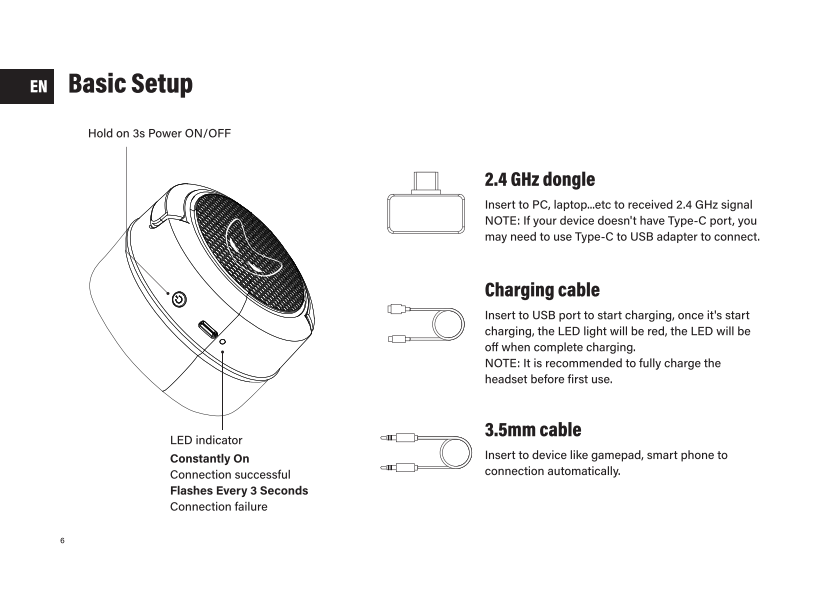
Charging needs a separate functional definition. The X3 materials confirm Type-C charging and show charge-status guidance. The RFQ should identify the supplied charging cable, expected indicator states, permitted charging sources stated in the manual and whether the headset can be used while charging. If a Type-C port is charging-only, marketing and support materials should not imply that it provides digital audio merely because the connector shape is USB-C.
The 3.5mm path is best treated as a fallback or alternate operating mode only after its exact behavior is confirmed. Analog audio can reduce dependence on the receiver or battery for some use cases, but the available microphone wiring and headset controls depend on the implemented circuit and cable. Buyers should verify audio channels, microphone operation, control behavior, power requirement and whether virtual 7.1 or lighting is active. The X3 materials confirm the cable and 3.5mm support; they do not justify assuming that every wireless feature transfers to the analog path.
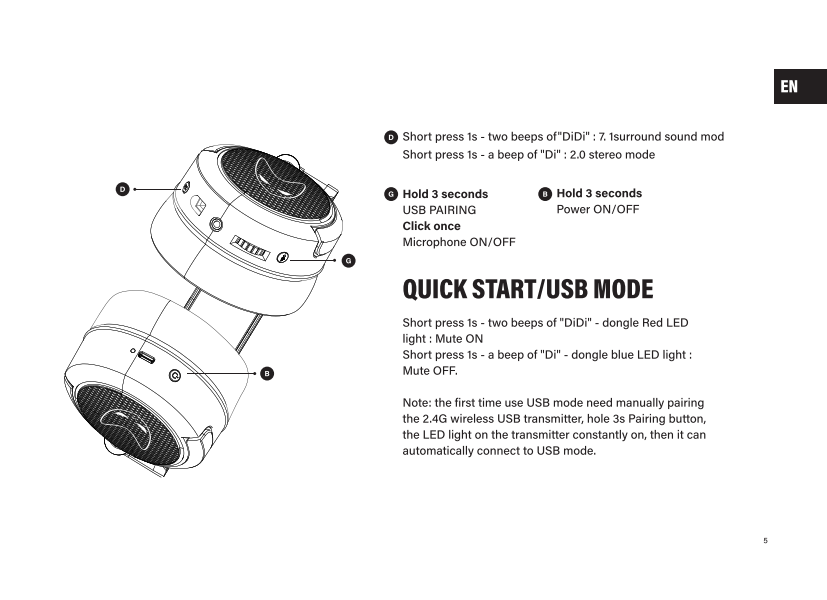
Pairing behavior connects hardware to user experience. The X3 manual includes first-use pairing instructions and indicator states. An OEM buyer should approve the complete sequence: what the user presses, how long it is held, what the headset and receiver LEDs show, when pairing succeeds, what happens after timeout and how to recover after a failed attempt. Automatic reconnection should be tested after headset power cycles, host restarts, receiver removal and ordinary charging events.
Mode controls require the same discipline. X3 supports virtual 7.1 and 2.0 modes, with audible feedback described in the manual. The product team should specify whether the setting is stored, which connection paths support it and how the user can identify the active mode. A feature is not retail-ready when it exists electrically but cannot be explained in a short, accurate instruction.
Mechanical, electrical and documentation approval should converge on one golden sample. The approved retail pack should contain the exact transmitter, adapter and cables used in validation. Production QC can then verify item identity, quantity, visible condition and representative function without relying on an accessory name that could describe several different parts.
Approve the production headset, receiver, adapter, cables and instructions as one golden configuration so accessory substitutions cannot undermine the promised device story.
Do Not Turn Connector Names Into Compatibility Claims
A connector describes a physical interface; a compatibility claim requires device-level evidence for the complete product configuration.
Type-C, USB-A and 3.5mm labels are useful starting points, but they do not prove support for every computer, console, controller, phone or handheld device that uses a similar port. A buyer should maintain a named host matrix with hardware version, system version where relevant, connection path and tested functions.
Marketing language should match the evidence level. 'Includes a Type-C 2.4GHz transmitter' is a component fact. 'Works with Device X' is a compatibility claim. 'All platforms' is broader still and should not be used without an explicit, maintained validation scope.
| Statement type | Meaning | Evidence needed |
|---|---|---|
| Connector fact | Describes the supplied physical interface | Approved specification and retail pack |
| Mode fact | Describes how the headset connects | Functional sample and operating instructions |
| Device claim | Promises operation with a named host | Device-level test with required functions |
| Universal claim | Implies broad compatibility | Extensive defined matrix and careful limitations |
Sample and Pre-Production Validation
Validation should follow each complete connection path from unpacking to recovery, using production-representative accessories and instructions.
Begin with pack-out verification. Confirm the transmitter, adapter, charging cable, 3.5mm cable and detachable microphone match the approved references and occupy the correct packaging positions. A function cannot help the customer when the required accessory is absent or difficult to identify.
Run setup as a first-time user. Follow only the included manual, observe pairing indicators, select audio modes and operate microphone controls. Record unclear steps and update instructions before print approval. Repeat with the target host list and capture which functions are available by connection mode.
Include ordinary interruption and recovery scenarios: headset power-off and restart, receiver removal and reinsertion, host restart, charging after low battery, failed first pairing and switching to or from the wired path. Define pass criteria for the project rather than relying on subjective comments such as connects normally.
At trial production, repeat representative checks, prevent unapproved accessory substitutions and confirm printed claims still match the final configuration.
- Verify every accessory against the approved part or golden sample.
- Test direct Type-C transmitter use on each claimed Type-C host.
- Test transmitter-plus-adapter use on each claimed USB-A host.
- Test audio and microphone behavior through the 3.5mm path.
- Confirm available controls, RGB and audio modes for every path.
- Follow first-pairing instructions without engineering assistance.
- Check reconnection after power and receiver interruptions.
- Confirm charging cable fit, indication and manual wording.
- Review product, manual, packaging and online compatibility claims together.
- Repeat representative checks with trial-production units.
From Product Brief to OEM/ODM Implementation
Brands can reduce development ambiguity by carrying the same interface matrix from RFQ through sample approval, packaging and mass production.
In the RFQ, define target users, target hosts, primary connection mode, secondary connection mode, receiver connector, required adapters, charging interface, wired fallback and functions expected in every path. Attach the first version of the host and accessory matrix.
During sampling, MACH industry can coordinate structure, PCB and RF review, acoustic work, logo and packaging customization, instructions, trial production and QC according to the approved project scope. Compliance planning should follow the target markets and final configuration rather than being inferred from a previous project.
Before mass production, freeze the accessory bill of materials, approved samples, pairing flow, mode behavior, packaging layout and claim matrix. Any substitute receiver, adapter or cable should go through change review because it may affect fit, function, instructions or compliance documentation.
Buyer Checklist for the RFQ
A useful wireless-headset RFQ tells the supplier exactly which devices, modes, accessories and user journeys must be delivered and validated.
- List target markets, sales channels and named host devices.
- Identify the primary gaming connection and any required alternate path.
- Specify the receiver connector, shape constraints and branding needs.
- State whether a USB-A adapter must be included.
- Define the Type-C port role: charging, data or another confirmed function.
- State whether a 3.5mm cable is included and which functions it must support.
- List audio playback, microphone, mute, volume, RGB and surround-mode requirements by path.
- Define first pairing, reconnection, indicator and recovery expectations.
- Provide the desired retail accessory layout and manual languages.
- Define compatibility wording that must be supported by testing.
- Request production-representative accessory samples before approval.
- Identify target-market compliance and documentation requirements.
- Set change-control rules for receivers, adapters and cables.
- Define pre-production and outgoing inspection requirements.
Conclusion
The best 2.4GHz headset accessory set is the one that supports the brand's promised use cases with the fewest ambiguous interfaces and the clearest validation evidence.
X3 shows how a Type-C transmitter, USB-A adapter, Type-C charging cable and 3.5mm fallback can create a flexible private-label platform. It also shows why the buyer must manage those elements as one system with pairing instructions, function-by-mode rules and controlled pack-out.
Use this matrix to prepare the RFQ, sample plan and production controls, then share the target hosts, interface plan, accessory list and expected quantity with MACH industry for evaluation.
Share your target devices, receiver format, wired fallback, accessory list, packaging requirements and estimated quantity for an OEM/ODM review.
Contact MACH IndustryFrequently Asked Questions
What is a 2.4GHz gaming headset interface matrix?
It is a buyer document that maps each target host and use case to a connection mode, physical interface, required accessory, supported functions and validation evidence.
Why should a wireless gaming headset dongle be specified separately?
The receiver connector, body shape, firmware behavior and host fit affect the complete connection path. It should have an approved part reference and be validated with the headset.
When does a Type-C gaming headset receiver need a USB-A adapter?
An adapter may be needed when a target host has USB-A rather than an accessible Type-C port. The exact receiver-and-adapter combination still requires device-level validation.
Does a Type-C charging port also support USB audio?
Not necessarily. USB-C describes the connector shape, not every supported function. Buyers must confirm whether the port is charging-only or supports any additional role.
Why include a 3.5mm cable with a 2.4GHz wireless gaming headset?
A 3.5mm cable can provide an alternate wired path for suitable devices, but buyers must confirm audio, microphone, controls, lighting and surround-mode behavior separately.
Can a connector type prove gaming headset compatibility?
No. A matching connector is only a physical starting point. A device compatibility claim requires testing the complete receiver, adapter, headset and function set on the named host.
What should buyers test during first pairing?
Test the control sequence, hold time, headset and receiver indicators, success state, timeout behavior, failed-pairing recovery and subsequent automatic reconnection where supported.
Should wireless and wired modes support the same functions?
Buyers should not assume they do. Audio, microphone routing, controls, RGB and virtual surround can differ by architecture and must be documented by connection mode.
How should headset accessories be controlled in mass production?
Freeze part references and golden samples, verify quantity and packaging position, prevent unapproved substitutions, and include representative fit and function checks in the quality plan.
What should a brand send MACH before requesting an OEM headset quote?
Send target devices and markets, required connection modes, receiver and adapter expectations, charging and wired-path needs, feature matrix, packaging scope, compliance requirements and estimated quantity.
Related Resources
Need OEM/ODM gaming audio solutions?
Contact MACH Industry to discuss your gaming headset, gaming earbuds, or private-label audio project.
Contact MACH Industry