Home > Resources > Gaming Headset Guide
How Brands Specify Dual 3.5mm Gaming Headsets for Desktop PC Programs
A B2B guide to defining separate headphone and microphone plugs, USB lighting, adapters, optional virtual 7.1 and private-label PC headset requirements.
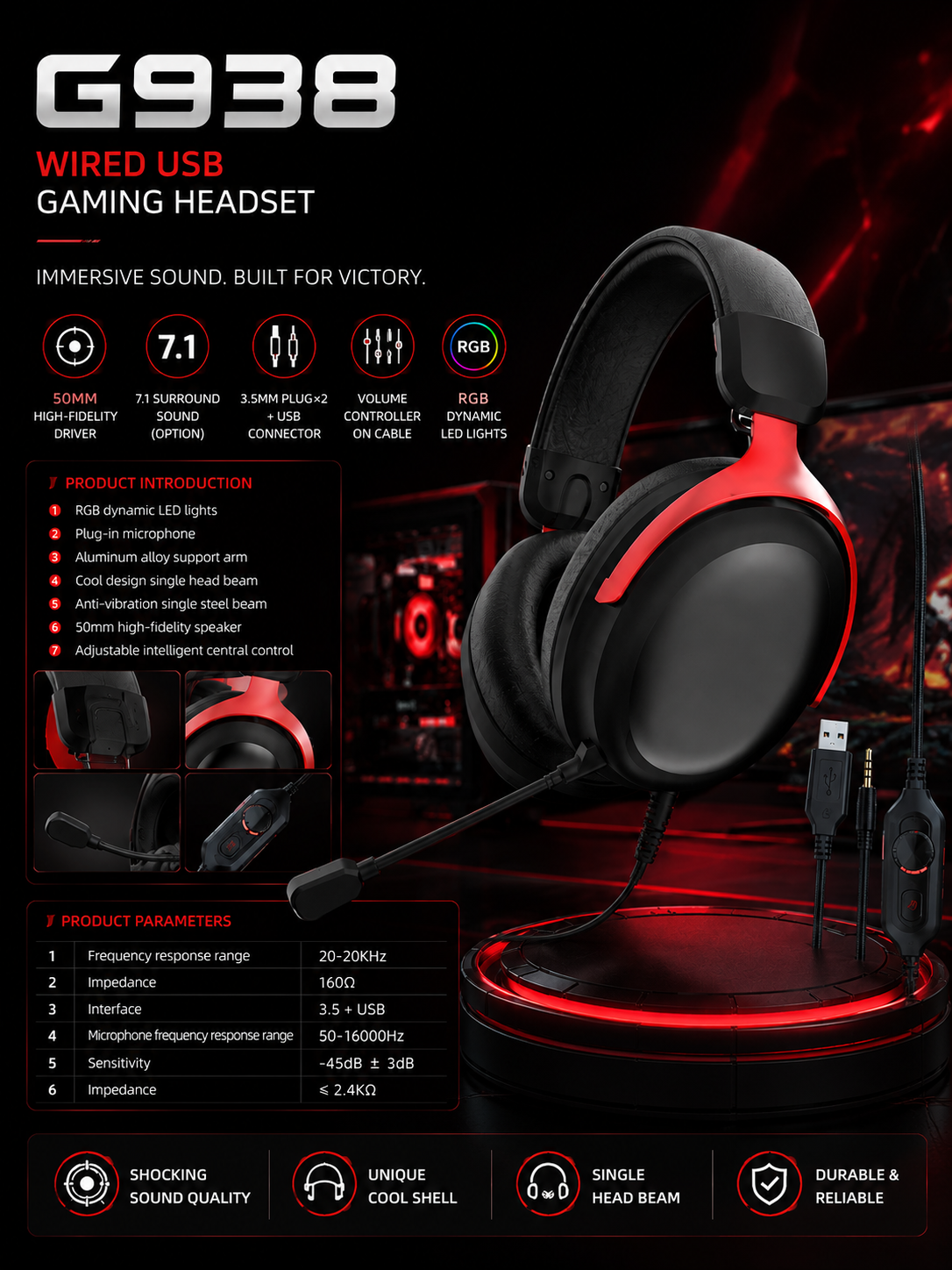
Brands sourcing a dual-3.5mm gaming headset should define the connection architecture before approving samples or packaging: one plug carries headphone audio, the second carries microphone input, and USB may power RGB or another confirmed auxiliary function. Devices with a single combined headset jack may require an adapter.
This distinction matters because a picture of two 3.5mm plugs plus USB can easily create incorrect compatibility or audio claims. A professional OEM brief should identify every target host, plug, adapter, audio route, microphone route, control and USB function, then separate the standard stereo SKU from any optional USB virtual 7.1 configuration.
MACH G938 is a useful desktop-PC-focused reference. Its public data confirms dual 3.5mm plugs, USB for applicable lighting or auxiliary functions, RGB dynamic LED lighting, a 50mm speaker, 16-ohm impedance, a plug-in microphone, inline volume control, aluminum-alloy support arm, single headband and anti-vibration steel-beam structure. The optional virtual 7.1 version requires a corresponding USB audio solution and project confirmation.
Understanding the Desktop PC Headset Development Requirement
Desktop PC headset buyers need a connection specification that distinguishes separate audio and microphone plugs from USB lighting, auxiliary or optional digital-audio functions.
Many desktop PCs expose separate 3.5mm outputs for headphones and microphone input. A dual-plug headset maps directly to that arrangement and can provide a clear wired product proposition for gaming, voice chat, PC bundles and gaming cafes. The same headset does not automatically connect without an adapter to every laptop, controller or mobile device that uses one combined jack.
The buyer pain point is usually not the existence of the plugs; it is unclear function. Product listings may show 3.5mm x2 + USB and imply that all three connectors carry audio. In a base G938 configuration, the two 3.5mm plugs are intended for separate headphone and microphone paths, while USB is defined for applicable RGB lighting or auxiliary functions. Final USB behavior depends on the project.
Product positioning should follow this architecture. A desktop-PC-focused stereo SKU can target entry-level and mid-range gaming brands, PC accessory bundles, gaming cafes, distributors and e-commerce programs. A higher feature SKU may evaluate optional virtual 7.1 through a corresponding USB audio solution, but that becomes a different functional configuration with different tests and instructions.
Differentiation can come from RGB, structure, microphone, CMF, cable, controller, package and accessories. Each change should remain consistent with the connection story. A stylish product still creates returns if customers cannot identify which plug goes where or why USB is required.
| Buyer issue | Uncontrolled claim | Required definition |
|---|---|---|
| Dual 3.5mm plugs | Works with every 3.5mm device | Separate headphone and microphone ports on approved hosts |
| USB connector | USB audio included | Lighting, auxiliary or verified audio role by configuration |
| Single-jack devices | Directly compatible | Adapter type and validated function |
| Virtual 7.1 | Included in every unit | Optional USB audio solution, controls and supported hosts |
G938 Project Overview
G938 is an independent wired PC gaming headset platform using separate 3.5mm headphone and microphone plugs plus USB for applicable RGB or auxiliary functions.
The product identity is G938-WIRED-3.5MM-DUAL-USB. It should not inherit Bluetooth, 2.4GHz, dongle, battery, charging, wireless latency or playtime specifications from other products or similarly named wireless variants.
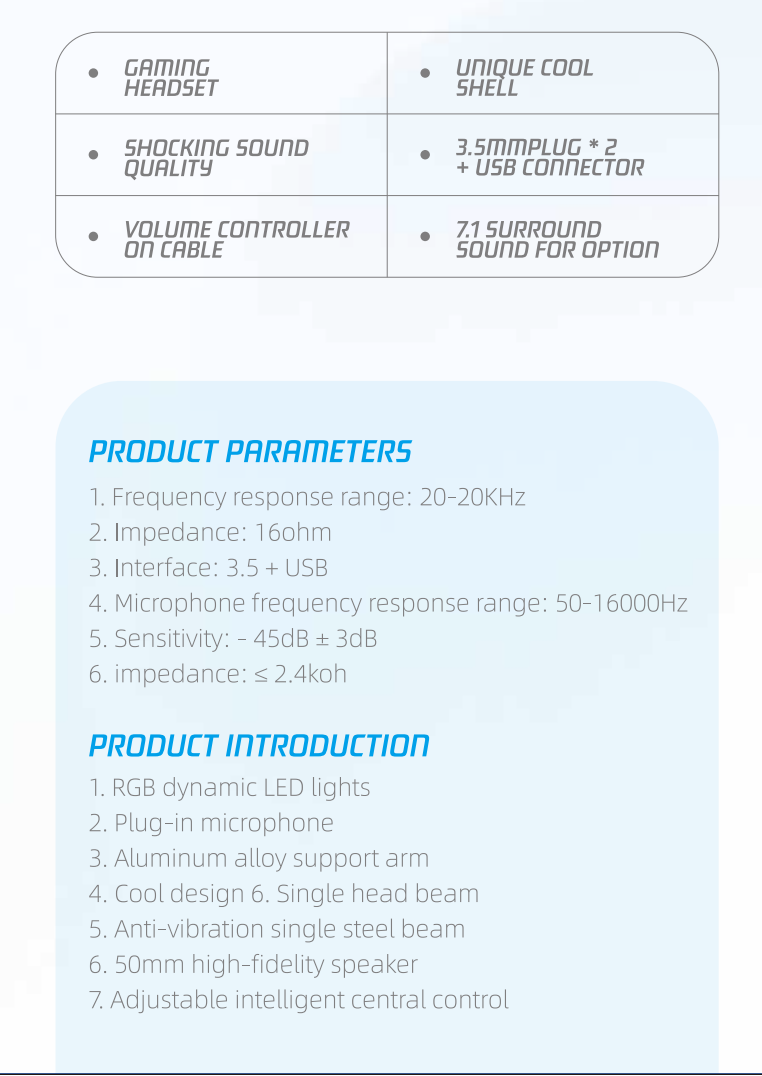
The audio platform uses a 50mm speaker with 20Hz-20KHz published frequency response and 16-ohm impedance. Driver size is a useful platform specification, but the final result depends on enclosure, cushions, source output, tuning and production consistency.
The plug-in microphone is specified at 50Hz-16000Hz response, -45dB plus or minus 3dB sensitivity and impedance at or below 2.4K ohms. The detachable direction can help packing and service planning, while connector retention, positioning and voice performance require final-sample validation.
Other confirmed features include RGB dynamic LED lighting, inline volume control, aluminum-alloy support arm, single headband, anti-vibration single steel beam and adjustable central control. MOQ and lead time are project dependent after sample approval.
Published applications include desktop PC programs, accessory bundles, gaming cafes, entry- and mid-range brands, e-commerce private label, retail, voice communication and distributor portfolios.
Dual 3.5mm Audio, Microphone and USB Functions Explained
The base G938 architecture separates analog headphone and microphone signals across two 3.5mm plugs, while USB has a separately defined powered or auxiliary role.
A desktop PC may use one jack for stereo headphone output and another for microphone input. The headset's two plugs should be identified by color, icons or labels and documented in the manual. The buyer should confirm plug wiring and the target computer ports rather than relying only on connector diameter.
Many laptops, game controllers and portable devices use a single combined headset jack. Connecting a dual-plug headset may require a correctly wired adapter that combines headphone and microphone paths. Audio-only adapters or incompatible wiring can produce playback without microphone input.
USB is a separate design decision. In the published base definition, it supports applicable RGB lighting or auxiliary functions, not an automatic digital audio claim. Buyers should state whether lighting works whenever USB power is present, whether there are controls, and how cable routing is explained.
Optional virtual 7.1 changes the USB role because it requires a corresponding USB audio solution. The project must define audio routing, microphone input, mode control, indicators, supported hosts and any software or driver requirement. The standard analog version and optional USB audio version should not share packaging claims unless those claims are true for both.
This function-first approach supports accurate AI and search answers as well as lower return risk. A buyer can explain exactly what each connector does, which accessory is required and which SKU includes virtual surround.
| Connection element | Base role | Buyer verification |
|---|---|---|
| Headphone 3.5mm plug | Analog stereo output path | Wiring, approved hosts and channel playback |
| Microphone 3.5mm plug | Analog microphone input path | Wiring, input level and voice function |
| USB in base configuration | Applicable RGB lighting or auxiliary function | Power, lighting behavior and controls |
| USB in optional 7.1 configuration | Corresponding digital audio solution | Audio, microphone, surround, software and hosts |
| Combined-jack adapter | Combines separate audio and microphone paths | Wiring standard and target-device test |
Designing a Connection and Adapter Matrix for Desktop PC Programs
A connection and adapter matrix converts G938's three connectors into device-specific instructions, package contents, tests and claims before production.
Start with the target-device list, not a generic compatibility slogan. Create one row for each desktop PC, laptop, controller or other approved host class. Record its available ports, the headset plugs used, any adapter, whether USB power is available, and whether audio, microphone, inline volume, RGB and optional 7.1 are required.
For desktop PCs with separate headphone and microphone ports, the direct dual-plug path is straightforward. The matrix should still confirm plug identification, cable reach, front-versus-rear panel use and microphone input. Gaming-cafe installations may need additional attention to cable routing, repeated plugging and clear labels.
For a device with one combined headset jack, define the adapter precisely. It must accept separate headphone and microphone plugs and present the correct combined wiring to the host. Test playback, microphone and inline control behavior. An adapter shown in marketing should be included in the bill of materials and package inspection.
Treat USB as its own column. In a base RGB version, record that USB supplies the applicable lighting or auxiliary function and does not replace the analog audio plugs. If a target setup has no convenient USB port, decide whether an extension, powered source or no-lighting use case is acceptable. These decisions belong in instructions.
If the brand wants virtual 7.1, create a separate SKU or configuration row. Confirm the corresponding USB audio solution, supported operating systems or hosts, audio and microphone path, stereo/7.1 switching, controls, prompts or indicators, and any software installation. Do not attach 7.1 language to the base analog configuration by default.
The matrix should control accessories. List the included adapter, extension, cable, microphone and documentation for each SKU. Packaging artwork, e-commerce diagrams and customer-support scripts should use the same matrix. This avoids a support team promising functions that engineering approved only for another configuration.
Validation should use production-representative cables, plugs, controller, microphone, USB solution, firmware if applicable and accessories. Record sample revisions and results for audio, microphone, controls, RGB and 7.1. A change to an adapter or USB controller returns affected rows to testing.
Finally, convert the matrix into production checks. Operators can verify plug colors or icons, microphone presence, correct adapter, RGB operation, analog audio and microphone continuity, and the right package for each SKU. The matrix therefore connects buyer intent with factory execution.
| Matrix field | Example decision | Controlled output |
|---|---|---|
| Target host | Desktop PC with separate ports | Direct dual-plug instruction |
| Combined jack | Laptop or controller with one port | Named adapter and verified functions |
| USB role | RGB power in base SKU | No unsupported USB audio claim |
| 7.1 option | Separate USB audio configuration | SKU-specific tests, packaging and software note |
| Accessories | Microphone, adapter and instructions | BOM and package inspection |
OEM/ODM Considerations for Gaming Brands
G938 OEM development can adapt branding, CMF, RGB, cable, controller, microphone, packaging and accessory bundles while preserving a verified connection architecture.
Custom logo and CMF are subject to project and engineering review. Buyers should provide vector artwork, color standards, finish references and cosmetic limits. Appearance samples should use the final RGB direction because housing color can change the visual effect.
RGB color or behavior can be evaluated for the released configuration. Define zones, effects, controls and USB power behavior. The package should state whether USB is required for lighting.
Cable length, material and plug configuration can be discussed. Dual-plug identification, strain relief, branch point, inline controller and USB branch should be included in the cable drawing and durability plan.
The inline controller and plug-in microphone shape can be evaluated. Microphone accessory planning should cover retention, protection, package location and replacement. Structural changes need voice and mechanical validation.
Retail packaging, manuals, labels, barcodes, adapters and accessory bundles are supported according to target devices. Certification coordination is available by market requirement, but no universal completed certification is claimed for every G938 configuration.
- Freeze the base stereo or optional USB 7.1 configuration.
- Define logo, CMF and RGB direction.
- Release cable, plugs, branch points and controller drawing.
- Approve microphone structure and accessory plan.
- Match adapters to target-device rows.
- Align packaging claims with the connection matrix.
- Plan destination-market certification coordination.
Technical Specifications Explained
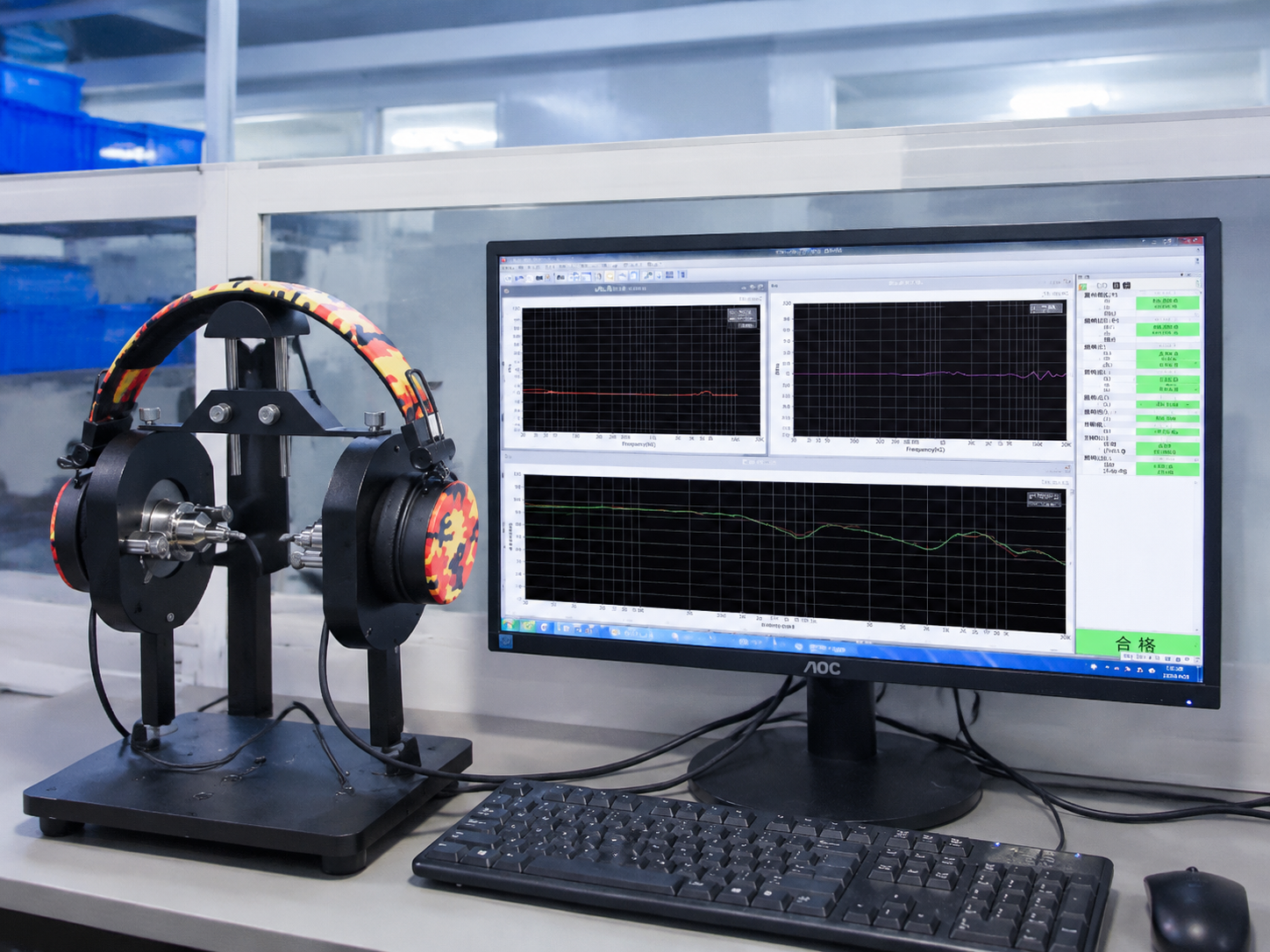
G938's published specifications establish a PC-oriented platform, while final acoustic, voice, connection and structural results depend on the approved OEM configuration.
The 50mm driver and 20Hz-20KHz range are useful platform descriptors, but driver diameter and nominal range do not establish tuning quality. The 16-ohm load should be evaluated with the intended analog or optional USB source.
The microphone's published response, sensitivity and impedance identify its electrical direction. Voice-chat performance still depends on microphone position, boom shape, host input and environmental conditions.
The aluminum-alloy arm, single headband, anti-vibration steel beam and adjustable central control define the mechanical direction. Buyers should approve adjustment, fit, cable pull, repeated use and cosmetic standards.
Optional virtual 7.1 is not a passive result of the 3.5mm plugs. It requires the corresponding USB audio solution and project confirmation. This distinction should remain visible in quotations, samples, packaging and online content.

Who Is This Product Platform Suitable For?
G938 suits PC-focused gaming brands and channels that can explain separate analog audio and microphone plugs, USB-powered features and any required adapter.
Desktop PC gaming brands and accessory bundles are the clearest fit because separate headphone and microphone ports match the base architecture. Gaming cafes may value a wired platform with direct connection logic and no battery management.
Private-label and retail brands can create a standard stereo SKU for value channels and evaluate an optional 7.1 USB audio configuration for a higher feature tier. The two versions should retain separate specifications and packaging where their functions differ.
Distributors can use adapter bundles and market-specific manuals when target devices require them. E-commerce sellers should publish connector diagrams and package contents instead of broad compatibility icons.
The platform is not ideal when the buyer requires a single-plug-only product, wireless functions or automatic compatibility with every console and mobile device without accessories.
Buyer Checklist Before Developing a Wired Gaming Headset
A complete G938 RFQ should define target hosts, plug functions, USB role, SKU strategy, accessories, acoustic and voice goals, customization and destination-market requirements.
List each device class and its ports. State whether the base product remains dual-3.5mm stereo with USB RGB, whether a combined-jack adapter is included, and whether an optional USB 7.1 SKU is required.
Define sound and microphone approval scenarios, cable length and material, controller, RGB, structure and fit. Provide logo, CMF, packaging and barcode requirements.
Identify destination markets, certification coordination, sample stages, forecast quantity and launch schedule. MOQ and lead time for G938 remain project dependent after sample approval.
- Desktop PC, laptop, controller and other target-host matrix
- Separate 3.5mm audio and microphone plug definition
- USB lighting, auxiliary or optional audio role
- Combined-jack adapter and accessory bundle
- Stereo versus virtual 7.1 SKU plan
- Audio, microphone, cable and structural approval
- Logo, CMF, RGB, packaging and documentation
- Market, certification, sample and schedule requirements

Conclusion
A dual-3.5mm gaming headset becomes production-ready when every plug, USB function, adapter, accessory and SKU claim is tied to a tested target-device configuration.
G938 provides a confirmed foundation with separate headphone and microphone plugs, USB for applicable RGB or auxiliary functions, a 50mm driver, plug-in microphone, inline control and PC-oriented mechanical structure. Optional virtual 7.1 requires a corresponding USB audio solution and separate confirmation.
MACH industry can review your host matrix, stereo and 7.1 SKU plan, adapters, cable, microphone, RGB, branding, packaging and destination markets. A precise connection brief helps engineering, production and customer-facing content describe the same product.
Frequently Asked Questions
What is a dual 3.5mm gaming headset?
It is a wired headset with one 3.5mm plug for headphone audio and a second 3.5mm plug for microphone input, typically for compatible desktop PCs with separate ports.
What does the USB connector do on the base G938?
The published base definition uses USB for applicable RGB lighting or auxiliary functions. Final USB behavior must be confirmed for the selected project configuration.
Does G938 USB always carry gaming audio?
No. USB audio is not automatic in the base version. Optional virtual 7.1 requires a corresponding USB audio solution and project confirmation.
Can G938 work with a laptop or controller that has one combined jack?
It may require a correctly wired adapter that combines the separate headphone and microphone plugs. The adapter and final functions should be validated on each target device.
What speaker and microphone specifications are confirmed for G938?
G938 confirms a 50mm speaker, 20Hz-20KHz response and 16-ohm impedance, plus a plug-in microphone with 50Hz-16000Hz response, -45dB plus or minus 3dB sensitivity and impedance at or below 2.4K ohms.
Can brands create standard stereo and virtual 7.1 G938 SKUs?
Yes, subject to project evaluation. The optional 7.1 SKU requires a corresponding USB audio solution, separate validation and accurate SKU-specific packaging.
What G938 customization can MACH evaluate?
Options include logo, CMF, RGB direction, cable and plugs, inline controller, plug-in microphone shape, packaging, manuals, labels, adapters, accessories and optional USB 7.1.
What is the G938 MOQ and lead time?
MOQ is project dependent, and lead time is project dependent after sample approval.
Can MACH coordinate certification for a G938 private-label project?
Certification coordination is available according to target-market requirements. Required testing depends on the final configuration; no universal completed certification is implied.
What should a buyer prepare for a G938 OEM quotation?
Prepare target devices and ports, stereo or 7.1 SKU plan, USB role, adapters, cable, microphone, RGB, branding, packaging, destination markets, forecast and schedule.
Related Resources
Need OEM/ODM gaming audio solutions?
Contact MACH Industry to discuss your gaming headset, gaming earbuds, or private-label audio project.
Contact MACH Industry